How to Advertise on Roku: The Complete Small Business Guide
slug: roku-advertising-small-business · status: draft · score: 74% · 1 versions
View published version → · Contentful entry: 1HeA0UVn4OSfEtoibGJ37u
Validation
| Rule | Detail | |
|---|---|---|
| pass | No banned competitors | No banned competitors |
| pass | No emdashes | No emdashes |
| pass | Avoid AI telltale words | No AI telltale words |
| pass | Primary keyword in title | No primary keyword to check |
| pass | Use contractions | Contractions used |
| fail | Minimum internal links | Internal links not in sitemap: /resources/local-tv-advertising-costs, /how-it-works, /features, /try-free, /try-free |
| fail | FAQ section required | Missing FAQ / 'Common questions answered' section |
| fail | Author assigned | No author assigned (never use 'Adwave Team' for new content) |
| pass | Title length 50-60 | Title length 59 |
| warn | Minimum 4 images | Only 3 image(s); minimum 4 (1 hero + 3 body) |
| pass | SEO description under 160 | seoDescription 144 chars |
| pass | Adwave mention cadence | 8 Adwave mentions |
| pass | Short description present | shortDescription 160 chars |
| warn | Word count by type | Word count 1988 below target (2500-5000) |
| warn | Year-dated title for evergreen types | Year-dated type should include (2026) in the title |
| pass | No manual table of contents | No manual TOC |
Images (3)
Content
How to Advertise on Roku: The Complete Small Business Guide
Subtitle: Everything you need to reach Roku's 80+ million users without a big budget
You've probably seen ads on Roku. Maybe a competitor's commercial popped up while you were streaming, and you thought: "How do I get my business on there?" If you're wondering how to advertise on Roku, you're in the right place.
Good news: Roku advertising for small business is more accessible than ever. With over 81 million active accounts and 47% of all U.S. TV streaming time happening on Roku devices, it's one of the most powerful ways to reach audiences on the biggest screen in their homes.
Here's everything you need to know about Roku ads for local business, including Roku ad costs, targeting options, and how to actually get started using Roku Ads Manager or alternative platforms.
Understanding Roku's Advertising Ecosystem
Before diving into tactics, it helps to understand what Roku actually is and how advertising works on the platform.
Roku is a streaming platform, not just a device. While many people know Roku as the little black box that connects to their TV, the company also makes Roku TVs (smart TVs with Roku built in) and powers the streaming experience for millions of households.
The Roku ecosystem includes:
- The Roku Channel: Roku's own free, ad-supported streaming service with movies, shows, and live TV
- Third-party streaming apps: Netflix, Hulu, Peacock, Tubi, and hundreds more accessible through Roku devices
- The Roku Home Screen: The interface users see when they turn on their Roku device
Where ads appear:
Roku offers several advertising placements, and understanding them helps you plan your strategy:
- Video ads within streaming content: 15, 30, or 60-second spots that play during shows and movies on The Roku Channel and other ad-supported apps
- Home screen placements: Marquee ads and Showrooms that appear when users navigate the Roku interface
- Screensaver ads: Cinematic ads that display when a Roku device is idle
For most small businesses, standard video ads within streaming content offer the best combination of reach and affordability.
Roku Advertising Costs: What to Really Expect
Let's talk numbers. What does it actually cost to advertise on Roku?
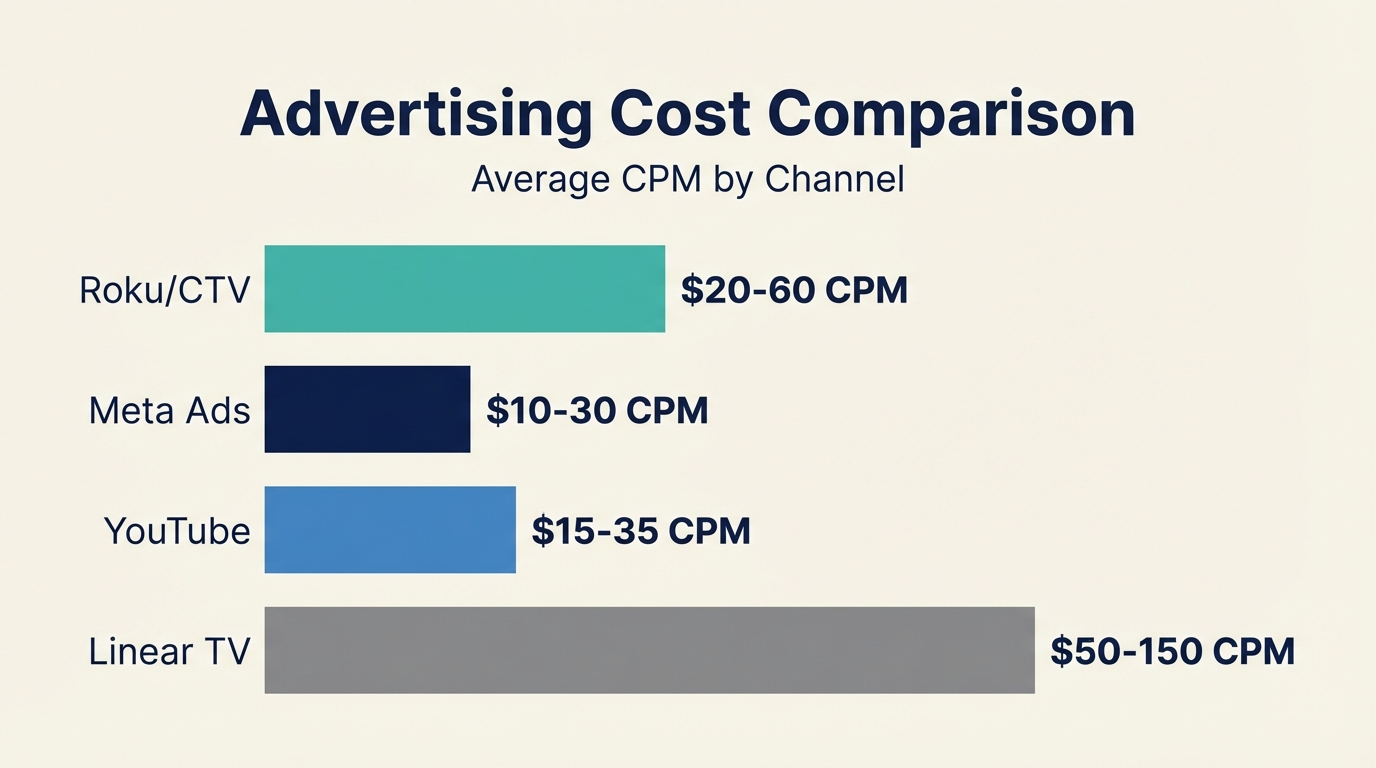
CPM (Cost Per Thousand Impressions): Industry sources suggest Roku CPMs typically range from $20 to $60. This means reaching 1,000 viewers costs between $20 and $60, depending on several factors.
Factors that affect your costs:
- Placement type: Video ads within content are generally more affordable than premium home screen placements
- Targeting specificity: Highly targeted campaigns may cost more but deliver better results
- Time of year: Expect higher CPMs during Q4 (holiday season) and major events
- Ad format: Standard video ads are typically cheaper than interactive formats
Minimum budgets:
Roku's own self-serve platform (Roku Ads Manager) has varying minimum requirements. However, platforms like Adwave let you access Roku inventory with minimums as low as $50, making it far more accessible for small business testing.
A realistic small business budget:
- Testing phase: $100-$500 to validate your message and targeting
- Active campaign: $500-$2,000 per month for meaningful reach
- Budget math: At a $30 CPM, a $300 budget gets you roughly 10,000 impressions
Targeting Options on Roku
One of Roku's biggest advantages over traditional TV is targeting precision. You're not buying time slots and hoping the right people are watching. You're reaching specific audiences.
Geographic targeting:
- Target by state, DMA (Designated Market Area), or ZIP code
- Perfect for local businesses that only serve specific areas
- A pizza shop in Denver can reach households within their delivery radius, not the entire state
Demographic targeting:
- Age ranges (e.g., 25-54)
- Household income levels
- Presence of children
- Education level
Interest and behavioral targeting:
- Viewers who watch specific content categories (sports, cooking, news)
- Shopping behaviors and purchase intent
- Device ownership and usage patterns
First-party data advantages:
Roku has something most advertising platforms don't: direct relationships with their users. When someone creates a Roku account, Roku knows what they watch, when they watch, and on which devices. This first-party data enables targeting that doesn't rely on cookies or third-party data sources.
How to Create Ads That Work on Roku
TV advertising has different requirements than digital ads. Here's what you need to know:
Technical specifications:
- Resolution: Minimum 720x480p (1080p recommended)
- Frame rate: Minimum 30fps
- Length: 15, 30, or 60 seconds (30 seconds is most common)
- File format: MP4 or MOV
- Text on images: Keep below 20% of the frame
Creative best practices:
1. Design for the big screen. Your ad will be viewed on TVs, not phones. Text needs to be large enough to read from across the room. Details that work on mobile may be invisible on TV.
2. Front-load your message. Get your key point across in the first few seconds. Even though Roku ads are non-skippable, attention is precious.
3. Include a clear call to action. What do you want viewers to do? Visit your website? Call a number? Remember your brand? Make it explicit.
4. Prioritize audio quality. Many viewers will hear your ad before they look up from their phones. Strong audio ensures your message lands even without full visual attention.
5. Keep it simple. One message, one call to action. TV isn't the place for complex explanations.
Don't have video?
This used to be the biggest barrier to TV advertising. Production costs could run $5,000 to $50,000 for a professional commercial.
Today, AI-powered tools have changed the equation. Platforms like Adwave can generate broadcast-ready video ads from your website, social media, or existing images in minutes. You don't need to hire a production company or have video editing skills.
Step-by-Step: Launching Your First Roku Campaign
Ready to get started? Here are your options:
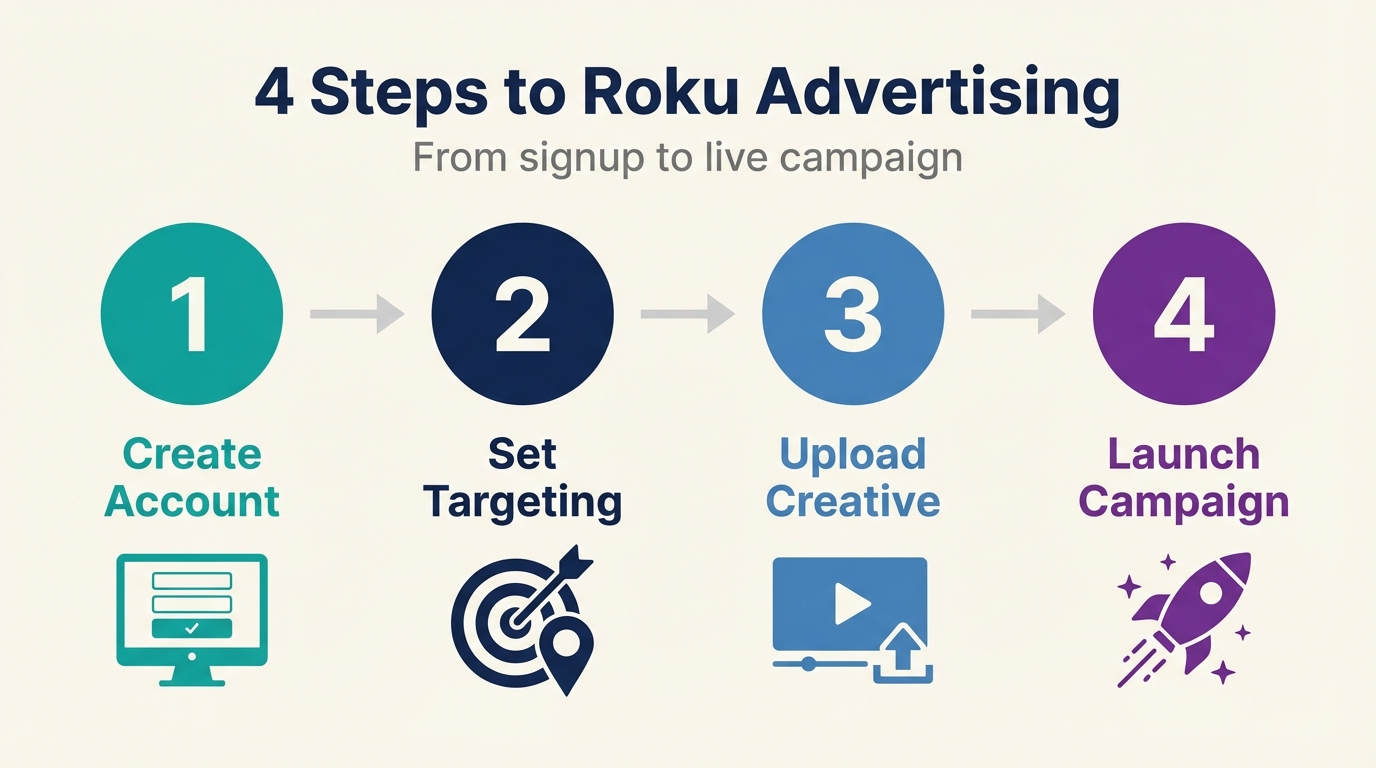
Option 1: Roku Ads Manager (Direct)
Roku offers a self-serve platform called Roku Ads Manager:
- Create an account at ads.roku.com
- Choose your campaign objective (awareness, consideration, or conversion)
- Define your target audience using geographic, demographic, and interest-based targeting
- Set your budget and campaign dates
- Upload your creative (video file meeting their specifications)
- Submit for approval (Roku reviews all ads for compliance)
- Launch and monitor performance in the dashboard
Pros: Direct access to Roku inventory, full control over targeting Cons: Higher minimums, requires existing video creative, Roku-only reach
Option 2: Platforms Like Adwave
Aggregator platforms offer an alternative path to Roku advertising:
- Create an account and provide your business information (website URL works)
- Generate or upload your ad (AI creation available if you don't have video)
- Set your targeting (geography, demographics)
- Set your budget (as low as $50 to start)
- Launch your campaign across Roku and 100+ other streaming channels
Pros: Lower minimums, AI creative generation, reach beyond just Roku Cons: Less granular Roku-specific controls
For most small businesses, starting with a platform like Adwave makes sense. You can test TV advertising with minimal budget and no production costs, then scale what works.
Measuring Roku Ad Performance
Unlike traditional TV where measurement was largely guesswork, Roku provides actual data on your campaign performance.
Key metrics to track:
- Impressions: How many times your ad was shown
- Reach: How many unique households saw your ad
- Completion rate: What percentage of viewers watched your entire ad (CTV typically sees 90%+ completion rates)
- Frequency: How many times the average viewer saw your ad
- CPM: Your actual cost per thousand impressions
Attribution considerations:
TV advertising, including CTV, is primarily a brand-building channel. Unlike search or social ads where someone can click directly to your site, TV viewers need to take a separate action (type in your URL, search for your brand, visit your store).
Ways to measure impact:
- Website traffic lift: Compare site traffic during and after campaigns
- Branded search volume: Monitor increases in people searching for your business name
- QR codes: Include scannable codes in your ads for direct tracking
- Promo codes: Offer TV-specific discount codes to track conversions
- Customer surveys: Ask new customers how they heard about you
Set realistic expectations: TV advertising builds awareness over time. Don't expect immediate direct-response results like you might from search ads.
Roku Advertising Through Adwave vs. Direct
For small businesses, the choice often comes down to simplicity versus control.
If you have existing video creative and want maximum control over Roku-specific campaigns, going direct through Roku Ads Manager gives you more options.
If you want to test TV advertising quickly with minimal budget and no production costs, Adwave is designed specifically for small businesses in your situation.
Getting Started Today
Roku advertising isn't just for big brands anymore. With 81+ million active accounts and the rise of self-serve platforms, reaching streaming viewers is accessible to businesses of virtually any size.
Here's your action plan:
- Determine your budget: Even $100 is enough to test
- Define your target audience: Geography and demographics at minimum
- Create or generate your ad: Use existing video or AI tools
- Choose your platform: Direct through Roku or via aggregators
- Launch, measure, and optimize: Start small, learn, then scale
The viewers are there. The targeting is precise. The costs are manageable. The question isn't whether Roku advertising can work for your business. It's whether you'll get started before your competitors do.
Ready to reach Roku viewers? Adwave can have your first TV ad running on Roku and 100+ other streaming channels in under 10 minutes, starting at just $50.
Version history
| Version | When | Summary |
|---|---|---|
| v1 | 6/20/2026, 3:11:54 AM | migration import |