YouTube TV Advertising: A Small Business Guide
slug: youtube-tv-advertising · status: draft · score: 78% · 1 versions
Not yet published.
Validation
| Rule | Detail | |
|---|---|---|
| fail | No banned competitors | Banned competitor mentioned: Simulmedia |
| pass | No emdashes | No emdashes |
| pass | Avoid AI telltale words | No AI telltale words |
| pass | Primary keyword in title | No primary keyword to check |
| pass | Use contractions | Contractions used |
| fail | Minimum internal links | Internal links not in sitemap: /resources/tv-advertising-for-small-business, /resources/ctv-vs-youtube-ads-comparison, /resources/advertise-on-local-tv, /resources/ctv-ad-creative-best-practices, /resources/how-to-measure-advertising-effectiveness |
| pass | FAQ section required | FAQ section present |
| fail | Author assigned | No author assigned (never use 'Adwave Team' for new content) |
| pass | Industry pages need taxonomy | Not an Industry page |
| pass | Title length 50-60 | Title length 46 |
| pass | Minimum 4 images | 4 images |
| warn | SEO description under 160 | Missing seoDescription |
| pass | Adwave mention cadence | 8 Adwave mentions |
| warn | Short description present | Missing shortDescription |
| pass | Word count by type | Word count 2627 (no target for type) |
| pass | Year-dated title for evergreen types | Type not year-dated |
| pass | No manual table of contents | No manual TOC |
Images (4)

Content
YouTube TV Advertising: A Small Business Guide
YouTube TV is not the same as YouTube. This distinction matters enormously for advertisers, and confusing the two can lead to wasted budgets and misaligned expectations.
YouTube TV is a virtual cable replacement service (vMVPD) that streams live TV channels over the internet. It's where cord-cutters watch live sports, news, and cable networks without a traditional cable subscription. For small businesses, YouTube TV advertising offers access to engaged, live-TV viewers who've actively chosen to keep watching traditional programming through modern delivery.
This guide explains how YouTube TV advertising works, how it differs from regular YouTube ads, and how small businesses can access this valuable audience.
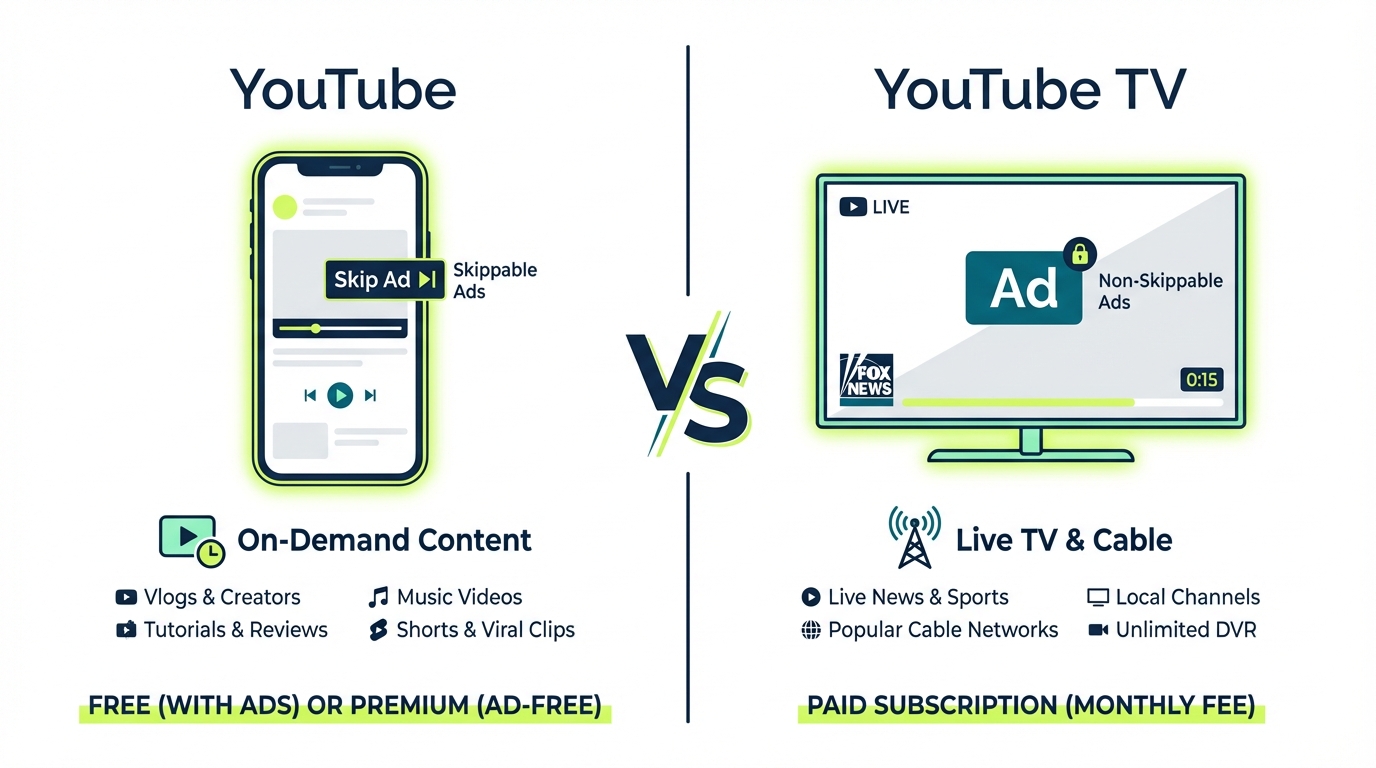
What Is YouTube TV? Different from YouTube
Let's clear up the confusion that trips up most advertisers.
YouTube (the video platform):
- User-generated and professional video content
- Free with ads, or ad-free with Premium subscription
- Viewers watch individual videos, shorts, music, tutorials
- Ads are often skippable after 5 seconds
- Primarily mobile and desktop viewing
- Available free to everyone
YouTube TV (the cable replacement):
- Live TV channels streamed over the internet
- Subscription service ($82.99/month as of January 2025)
- 100+ channels including ESPN, CNN, NBC, Fox, ABC, CBS
- Traditional commercial breaks like cable TV
- Primarily big-screen viewing on TVs
- Cloud DVR included (viewers can skip ads on recordings)
Why This Matters for Advertisers:
When you run "YouTube ads," you're typically buying inventory on the YouTube video platform with skippable pre-roll ads on mobile devices.
When you run "YouTube TV ads," you're buying spots in live TV programming, reaching viewers watching sports, news, and live events on their televisions. The ad experience is completely different.
YouTube TV vs. Regular YouTube Ads
Understanding these differences helps you choose the right approach for your business.
Ad Format: YouTube ads are often skippable after 5 seconds. YouTube TV ads are non-skippable, like traditional TV commercials.
Primary Device: YouTube is primarily watched on mobile and desktop. YouTube TV is primarily watched on televisions.
Viewing Context: YouTube offers on-demand videos. YouTube TV offers live TV programming.
Audience Mindset: YouTube viewers are actively searching and browsing. YouTube TV viewers are in lean-back entertainment mode.
Completion Rates: YouTube averages 30-40% completion (due to skipping). YouTube TV achieves 90%+ completion (non-skippable).
Targeting: YouTube offers detailed interest and behavioral targeting. YouTube TV offers geographic and demographic targeting.
Access: YouTube is available through Google Ads self-serve. YouTube TV inventory is accessed through programmatic platforms.
For Small Businesses:
YouTube (the platform) is easier to access and offers more targeting options but suffers from lower completion rates and smaller screen viewing.
YouTube TV offers premium, non-skippable placement during live TV but requires programmatic platforms to access and has less granular targeting.
Many businesses benefit from both channels, using YouTube for direct response and YouTube TV for brand awareness among live-TV viewers.
YouTube TV Advertising Costs
What should small businesses expect to pay?
Access Methods: YouTube TV ad inventory is primarily accessed through:
- Google's DV360 (enterprise-level DSP, high minimums)
- Programmatic CTV platforms (like Adwave, accessible minimums)
Cost Ranges:
DV360 Direct: According to Gupta Media, the minimum spend through Google's managed services is $35,000, with base CPMs starting at $32.28. Each demographic or audience targeting overlay adds approximately $5 to the CPM.
Programmatic (via Adwave): Start at just $50, with CPMs typically ranging from $20-25 according to Simulmedia's 2025 TV advertising cost guide.
What $500 Gets You: At a $25 CPM through programmatic buying, $500 delivers approximately 20,000 impressions across YouTube TV and other streaming platforms. These are non-skippable placements during live programming, meaning viewers watch your entire ad.
For context, that same $500 on regular YouTube might generate more impressions but with significantly lower completion rates due to skipping.
Who Watches YouTube TV?
Understanding the YouTube TV audience helps you decide whether it's right for your business.
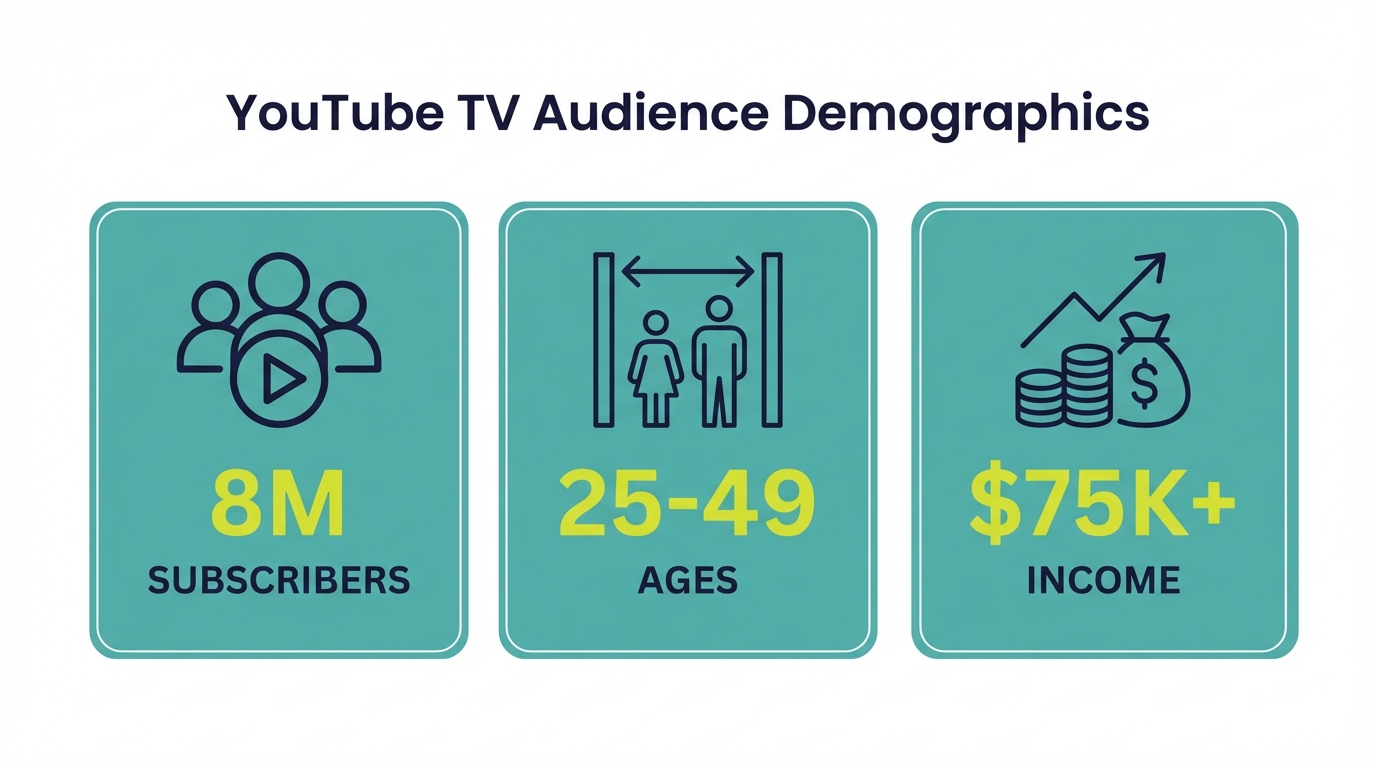
Subscriber Profile: YouTube TV has approximately 9-10 million subscribers as of late 2025, according to Omdia research. This makes it the largest vMVPD service, surpassing Hulu + Live TV (approximately 4.5 million subscribers).
Demographics: YouTube TV subscribers tend to be:
- Adults 25-49 (core demographic)
- Cord-cutters who still want live TV
- Sports fans (live sports is a primary driver)
- News watchers
- Higher-income households ($75K+ household income over-indexed)
- Tech-comfortable (willing to adopt streaming solutions)
Viewing Behavior: YouTube TV viewers are watching:
- Live sports: NFL, NBA, MLB, NHL, college sports on ESPN, Fox Sports, CBS, NBC
- Live news: CNN, Fox News, MSNBC, local news
- Cable networks: HGTV, Food Network, Bravo, Discovery channels
- Broadcast networks: ABC, CBS, NBC, Fox
The key insight: YouTube TV viewers chose to keep live TV in their lives. They're not streaming-only consumers who never watch traditional programming. They value appointment viewing, especially for sports and news.
Targeting Options on YouTube TV
YouTube TV advertising through programmatic platforms offers several targeting capabilities.
Geographic Targeting:
- National campaigns
- Regional (multiple markets)
- DMA (Designated Market Area)
- Some platforms offer zip code precision
For local businesses, geographic targeting is essential. You shouldn't pay to reach YouTube TV viewers in Phoenix if your restaurant is in Philadelphia.
Demographic Targeting:
- Age ranges
- Gender
- Household income
- Presence of children
Content Targeting: While you typically can't target specific channels on YouTube TV through programmatic, you can often target content categories:
- Sports programming
- News
- Entertainment
- Lifestyle
Daypart Targeting: Choose when your ads appear:
- Morning (news programming)
- Afternoon
- Prime time (highest viewership, highest cost)
- Late night
- Live sports windows (premium)
How to Advertise on YouTube TV
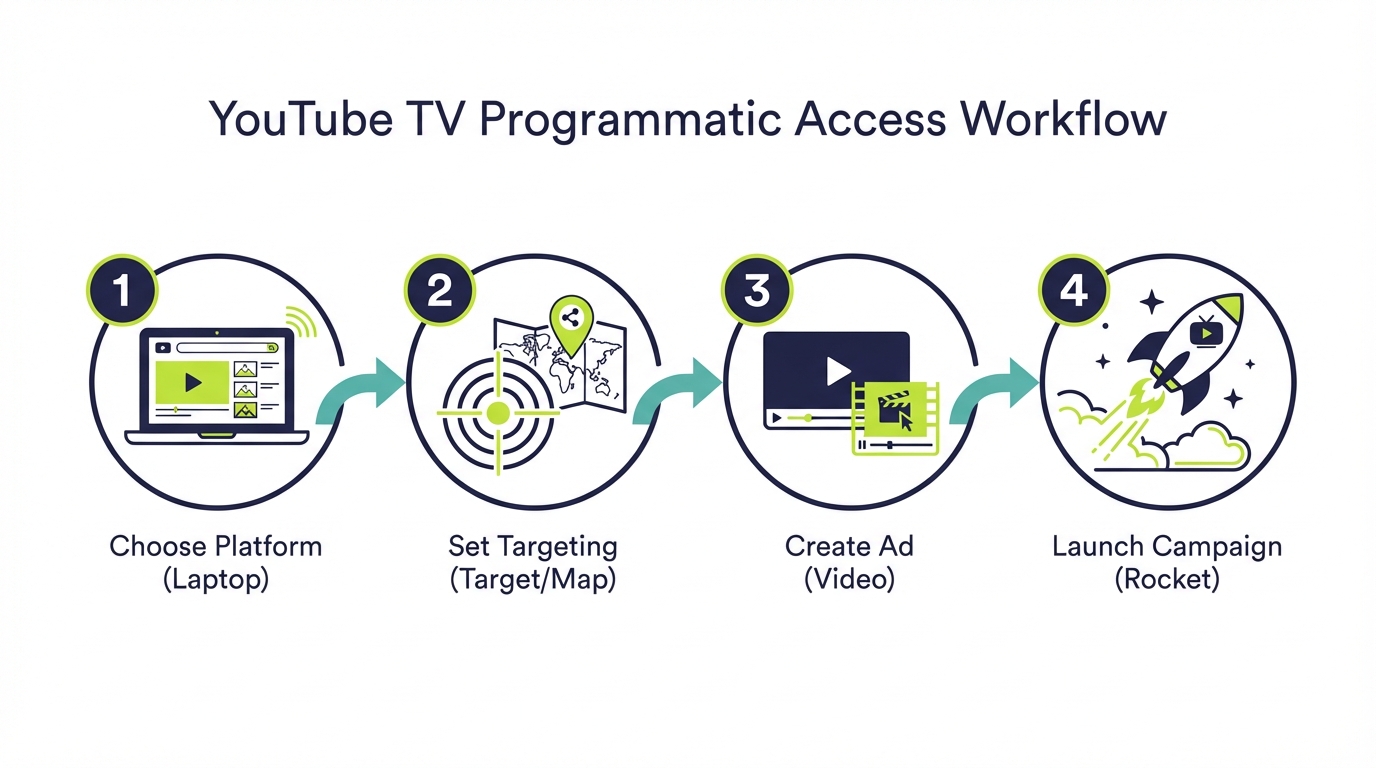
For small businesses, the path to YouTube TV advertising runs through programmatic CTV platforms.
Step 1: Choose Your Platform Select a programmatic platform that includes YouTube TV inventory. Platforms like Adwave aggregate streaming inventory from YouTube TV alongside other services (Hulu, Peacock, Tubi, etc.).
Step 2: Set Your Targeting Define your campaign:
- Geography: Where are your customers? Target your city, metro area, or service radius
- Demographics: Who are your customers? Age, income if relevant
- Daypart: When should ads run? Prime time for maximum reach, off-peak for lower costs
- Budget: Start with a test amount ($100-250) to gauge performance
Step 3: Create Your Ad You'll need video creative:
- 15 or 30 seconds (30 seconds standard for TV)
- High-definition quality (1080p minimum)
- Clear audio for big-screen viewing
- Strong call to action
No video? Platforms like Adwave offer free AI video creation tools to generate professional commercials from your business information.
Step 4: Launch and Measure Your campaign will deliver impressions across YouTube TV and other streaming platforms. Monitor:
- Impressions and reach
- Completion rates (should be 90%+)
- Website traffic changes
- Business results (calls, visits, inquiries)
Creating Ads for YouTube TV Viewers
YouTube TV viewers are watching on big screens during live programming. Your creative should match that context.
Technical Requirements:
- Format: MP4 or MOV
- Resolution: 1080p minimum (4K preferred)
- Length: 15 or 30 seconds
- Audio: Broadcast quality, clear dialogue
- Aspect ratio: 16:9
Creative Best Practices:
Match the viewing context Your ad appears during live TV programming alongside national brands. Professional presentation matters. You don't need a Super Bowl budget, but avoid anything that looks like a social media post.
Respect the lean-back environment YouTube TV viewers are relaxed, watching from their couch. Aggressive hard-sell tactics feel out of place. Focus on brand awareness and consideration rather than immediate conversion.
Include clear calls to action QR codes work well because viewers have phones nearby. Simple website URLs or phone numbers give interested viewers a clear next step.
Consider the sports audience A significant portion of YouTube TV viewing is sports. High-energy, enthusiastic creative can match the excitement of live sports viewing.
Front-load your message Get your business name and key value proposition in the first 5 seconds. Even non-skippable ads benefit from early impact.
Measuring YouTube TV Campaign Performance
Streaming TV measurement differs from digital advertising. Here's what to expect.
Available Metrics:
- Impressions: How many times your ad was shown
- Completion rate: Percentage who watched the full ad (expect 90%+)
- Reach: Unique households exposed
- Frequency: Average number of times each household saw your ad
- Geographic distribution: Where impressions were delivered
Business Impact Measurement: For local businesses, practical measurement focuses on:
- Website traffic lift during campaign periods
- Increase in phone calls or inquiries
- Foot traffic changes (if applicable)
- New customer source tracking ("How did you hear about us?")
- Branded search volume increases
TV advertising tends to lift overall business metrics rather than providing click-level attribution. Compare your key business indicators during and after campaigns to gauge impact.
YouTube TV vs. Other vMVPDs: How It Compares
YouTube TV isn't the only live TV streaming service. Understanding how it compares helps you allocate advertising budgets.
YouTube TV vs. Hulu + Live TV:
Both offer similar channel lineups and pricing. Hulu + Live TV bundles with on-demand Hulu content, which some viewers prefer. YouTube TV now has a larger subscriber base (9-10M vs 4.5M according to Omdia and Evoca TV) and is known for its better user interface. For advertisers, both are accessed through similar programmatic channels.
YouTube TV vs. Sling TV:
Sling is cheaper ($40 vs $83/month) but offers fewer channels. Sling's audience is more budget-conscious, while YouTube TV attracts viewers who want a complete cable replacement without compromise. YouTube TV viewers may have higher disposable income on average.
YouTube TV vs. FuboTV:
FuboTV specializes in sports, offering more sports channels than YouTube TV. If you're specifically targeting sports enthusiasts, FuboTV inventory can be valuable. YouTube TV offers broader programming appeal.
YouTube TV vs. FAST Services (Tubi, Pluto TV):
FAST services are free and ad-supported with lower CPMs ($10-30 vs $20-25 for YouTube TV, per Simulmedia). YouTube TV viewers are paying subscribers watching live programming. FAST viewers chose free content with more ads. Both are valuable; the choice depends on whether you want to reach live-TV-focused viewers (YouTube TV) or value-seeking viewers (FAST).
The Bottom Line:
For most small businesses, running campaigns across multiple vMVPD and FAST platforms makes more sense than exclusively targeting YouTube TV. Programmatic platforms automatically distribute your budget across available inventory, reaching viewers wherever they watch.
When YouTube TV Advertising Makes the Most Sense
YouTube TV advertising is particularly effective for certain business types and campaign goals.
Best Fit Business Categories:
Sports-Related Businesses: Sports bars, sporting goods stores, fitness centers, sports medicine practices, team merchandise sellers. YouTube TV's sports-heavy viewership makes it ideal.
Premium Services: Legal services, financial advisors, medical practices, home improvement contractors. YouTube TV households tend to have higher incomes and engage with premium service providers.
Event-Based Businesses: Restaurants, entertainment venues, event spaces. Live TV viewers are often planning activities and are receptive to event advertising.
Automotive: Dealerships, service centers, parts retailers. Sports audiences over-index for automotive interest.
Best Campaign Goals:
Brand Awareness: YouTube TV's non-skippable ads with high completion rates build strong brand recall.
Local Market Penetration: Geographic targeting lets you saturate your service area with repeated exposures.
Reaching Cord-Cutters: If your target audience has left cable, YouTube TV is one of the best ways to reach them on the big screen during live TV.
Complementing Digital Campaigns: YouTube TV builds the awareness that makes your digital campaigns more effective.
Less Ideal For:
Direct Response: If you need immediate, trackable conversions, digital advertising may be more suitable.
Very Limited Budgets: With $100 or less monthly, you may get better reach on FAST platforms where CPMs are lower.
Targeting Very Specific Interests: YouTube TV offers demographic and geographic targeting, but not the interest-level precision of digital platforms.
Common questions answered
What is the difference between YouTube and YouTube TV?
YouTube is a free video platform with user-generated content, tutorials, music, and more, primarily watched on phones and computers with often-skippable ads. YouTube TV is a paid subscription service ($82.99/month as of January 2025) that streams 100+ live TV channels including ESPN, CNN, and network broadcasts, primarily watched on televisions with non-skippable commercial breaks like traditional cable.
How do I advertise on YouTube TV?
Small businesses access YouTube TV advertising through programmatic CTV platforms like Adwave, not through Google Ads (which serves regular YouTube). These platforms aggregate streaming inventory and let you create campaigns targeting YouTube TV viewers alongside other streaming services. You can start with budgets as low as $50, set geographic and demographic targeting, and launch non-skippable TV commercials.
How much does YouTube TV advertising cost?
Through programmatic platforms, YouTube TV advertising typically costs $20-25 CPM (cost per thousand impressions) according to Simulmedia. Direct buys through Google's DV360 start at $32+ CPM with $35,000 minimums per Gupta Media. With Adwave, you can start campaigns at $50 with no minimums. This means $500 could deliver approximately 20,000-25,000 non-skippable ad impressions during live TV programming, a meaningful test for most local businesses.
Is YouTube TV good for reaching sports fans?
Excellent. Live sports is a primary reason people subscribe to YouTube TV. The service includes ESPN, Fox Sports, CBS Sports, NBC Sports, and regional sports networks. Sports viewers watch live (no DVR fast-forwarding through ads) and are highly engaged. For businesses targeting sports enthusiasts, YouTube TV provides valuable inventory alongside dedicated sports channels on other platforms.
Can local businesses afford YouTube TV advertising?
Yes, through programmatic platforms. While Google's enterprise advertising tools require large budgets ($35,000+ minimums per Gupta Media), platforms like Adwave make YouTube TV inventory accessible starting at $50. Local businesses can run geographically targeted campaigns reaching YouTube TV viewers in their specific market without the enterprise-level minimums that direct deals require.
YouTube TV Advertising Budget Planning
Planning your YouTube TV advertising budget requires understanding both costs and realistic outcomes.
Monthly Budget Recommendations:
$200-400/month (Starter):
- Approximately 8,000-16,000 impressions
- Reach an estimated 2,700-5,300 unique households
- Suitable for testing whether YouTube TV works for your business
- Focus on tight geographic targeting
$500-1,000/month (Local Impact):
- Approximately 20,000-40,000 impressions
- Reach an estimated 6,700-13,000 unique households
- Meaningful frequency in a local market
- Viewers see your ad 3-4 times on average
$1,500-3,000/month (Market Presence):
- Approximately 60,000-120,000 impressions
- Reach an estimated 20,000-40,000 unique households
- Strong market penetration
- Builds real brand recognition over time
$3,000+/month (Dominant Presence):
- Significant impression volume
- Multiple touchpoints per household
- Can support multiple creative executions
- Allows for daypart and content testing
Budget Allocation Tips:
Start with testing: Don't commit your entire budget immediately. Start with a test phase to understand performance in your market.
Consider seasonality: Increase budgets during your business's peak seasons when conversion probability is higher.
Don't spread too thin: It's better to dominate a smaller geographic area than to lightly cover a large one. Focus your budget for impact.
Allow time to work: TV advertising builds awareness over time. Commit to at least 8-12 weeks of consistent advertising to gauge true effectiveness.
Reach YouTube TV Viewers Today
YouTube TV puts live TV in the streaming age, and it brings small business advertising along with it. The service's 9-10 million subscribers represent engaged, affluent, live-TV viewers who can't be reached through regular YouTube advertising.
For small businesses, the path to YouTube TV advertising runs through programmatic platforms that make premium inventory accessible without enterprise-level budgets. Through Adwave, you can reach YouTube TV viewers alongside audiences on 100+ other streaming channels, starting at just $50.
Ready to reach live-TV viewers on YouTube TV? Create your first streaming TV campaign and put your business in front of sports fans, news watchers, and cord-cutters who kept live TV in their lives.
Version history
| Version | When | Summary |
|---|---|---|
| v1 | 6/20/2026, 3:11:55 AM | migration import |